
How it works
What is underfloor heating?
Underfloor heating is a thin electric heating cable laid into your floor and set in a levelling screed, underneath your tiles, stone or timber. When it's on, the whole floor becomes a gentle, even source of warmth — no radiators on the wall, no fan noise, and nothing to see.
Most people put it where a cold floor is felt the most: bathrooms, kitchens and living areas. You step out of the shower onto a warm floor, every morning, all winter.


The element we install
We install the Warm Floor NZ heating cable — designed right here in New Zealand for our climate. At just 2.6 mm thin it disappears into the screed, but it runs at around 13.5 watts per metre, warmer than the roughly 11.5 W/m worldwide standard, so your floor heats up faster.
Comes with a 25-year product warranty. Suits tile, stone, timber and more.

The thermostat we fit
Every install includes the Warm Floor TH04 colour touch screen thermostat. It senses both floor and air temperature, and its 7-day timer with three heating periods a day means the floor is warm exactly when you want it — toasty for your morning shower, off while you're at work.
Battery free, easy to use, and available in white or black to suit your wall. If you would rather control it from your phone, we also fit the Wi-Fi TH05.
Owner's guide
How to use your thermostat
Set a schedule and leave it alone — that is the whole trick. Put the thermostat in Auto, give it up to three heating periods a day around the times you use the room, and set a comfortable floor temperature rather than a hot one. Everything below applies to both thermostats we install, the TH04 and the TH05, with the TH05 extras called out at the end. Not sure which you have? The TH05 shows a Wi-Fi symbol at the top of its screen. The TH04 does not.
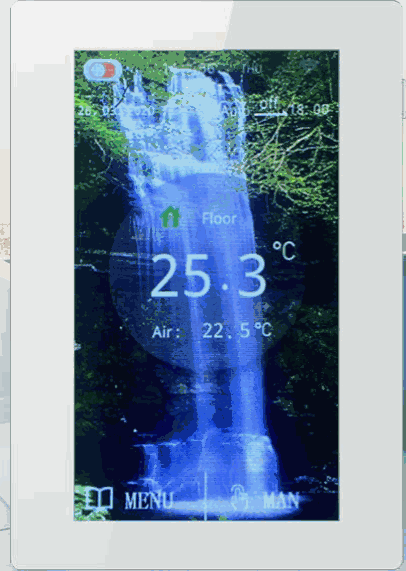
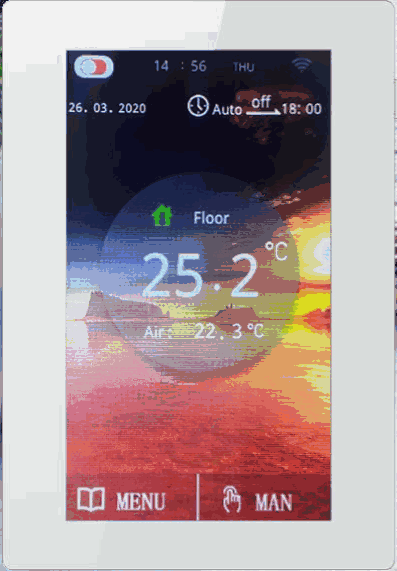
Reading the screen
- Target temperature sits top right — the temperature the thermostat is working toward.
- Current floor temperature shows when the thermostat is set to floor sensing. In air sensing it shows the room air temperature instead.
- The floor icon turns red while the heating is on. Yellow means it is on because the floor has dropped below the set-back minimum, not because a programmed period is running.
- Auto or Manual is shown as the current status, with the next programmed operation listed on the Auto screen.
Setting your heating schedule
Set the date and time first
Main menu → Date/Time. Touch the date or the time to highlight it, change it with the arrows, then confirm. Everything else depends on the clock being right.
Open Timers
Main menu → Timers. On a TH05, first choose MAIN for the floor or AUX for a towel rail — whichever you are editing is highlighted blue.
Choose the days
Three day blocks: weekday, weekend, or individual days. Highlight the days you want included, then confirm.
Set up to three periods a day
Each block has three heating periods. Touch the hours or minutes and use the arrows. Most homes only need two — one before you get up, one before the evening.
Leave it in Auto
Auto runs the schedule. You can check it any time under View Heating Schedule.
Temperature settings
Main menu → Temp/Settings. The information icon on the thermostat explains each one on screen:
- Auto target — what the floor is heated to during a programmed period. We set most floors to between 22°C and 26°C on handover, and that suits almost everyone. Set it comfortable, not hot: a floor only has to be warmer than your feet to feel warm, and winding it up costs money without making the room nicer.
- Maximum and minimum limits — the range the thermostat is allowed to work within.
- Set-back temperature — the lowest the floor is allowed to fall to between heating periods, so it never goes stone cold.
Auto, Manual, and the two off switches
Auto follows your schedule. This is where it should live.
Manual holds one temperature until you change it. Press MAN at the bottom right; if AUTO is showing at the bottom left you are already in manual. Useful for a one-off, but a floor left in manual is the usual reason a bill looks higher than expected.
Control On/Off turns the programmed heating periods off but keeps the set-back temperature, so the floor never goes completely cold. This is the one to use if you are away for a few days.
Main power button turns the heating off altogether. Use this one over summer.
Floor sensing or air sensing
Under Advanced Settings. Floor sensing controls the temperature of the floor itself, through the probe set in beside the cable — that is what we set up for bathrooms, and what you want in almost every case, because the whole point of the system is the surface you stand on. Air sensing controls the room air temperature instead, which suits a larger living space where the floor is one part of the heating rather than all of it. The TH04 comes with two probes, one of them a spare.
Extras on the TH05
Wi-Fi and the app. Main menu → Wi-Fi Settings, or the Wi-Fi icon on the home screen. The WF TH05 app then lets you change the schedule and temperature from your phone.
Adaptive function. Learns how long your room takes to warm and starts early, so the floor is up to temperature when your period begins instead of starting to heat then. It takes a few days to settle.
Energy usage. Enter your cable wattage and what you pay per unit of power, and the thermostat shows an approximate running cost.
AUX output. A second circuit for a heated towel rail or a mirror demister, on its own schedule — and the floor can be switched off on its own while the towel rail keeps running, which is what most people want over summer.
A few things worth knowing
- Program lock. Under Program Options. Worth using in a rental, so a schedule cannot be changed by accident.
- After a power cut. You can set what the thermostat does when the power comes back, so it does not need resetting every time.
- Brand new install. Do not switch the heating on until the tile adhesive has fully cured — a minimum of 7 days after tiling.
- Warming up. A floor takes 20–30 minutes to reach a comfortable temperature from cold, so the schedule should start before you want the room, not when.
Not sure about something on your thermostat?
We installed it, so ask us. The most common thing people ask after an install is simply how to work the thermostat, and we can usually sort it out over the phone. Tell us which thermostat you have and what you need, and we will come back to you — usually within a day.
Common questions
What temperature should I set my underfloor heating to?+
Between 22°C and 26°C suits almost every home, and that is what we set floors to on handover. Anything higher costs more to run without making the room feel better — a floor only has to be warmer than your feet to feel warm.
Will you show me how to use it?+
Yes — we set the thermostat up and show you how to work it before we leave the job. It is the most common thing people ask us about, so we take the time to walk you through the schedule and the settings on the day. Have whoever will actually be using the heating there if you can. If you get stuck later, give us a call and we can usually talk you through it over the phone; a return visit to the house is a chargeable callout.
How do I set the schedule on my underfloor heating thermostat?+
On both the TH04 and TH05, open the main menu and choose Timers. Pick a day block — weekday, weekend or individual days — then set up to three heating periods for that block. Touch the hours or minutes and use the arrows to change them, confirm, and the thermostat runs that schedule whenever it is in Auto mode.
What is the difference between Auto and Manual mode?+
Auto runs the schedule you have programmed and holds the auto target temperature during each heating period. Manual ignores the schedule and holds whatever temperature you set until you change it. Press MAN at the bottom right of the screen for manual; if AUTO is showing at the bottom left you are already in manual.
What do the red and yellow floor icons mean?+
Red means the heating is on and working toward your target temperature. Yellow means the heating is on because the floor has dropped below the set-back minimum, not because a programmed heating period is running.
What is the difference between floor sensing and air sensing?+
Floor sensing controls the temperature of the floor itself, using the probe set into the floor beside the cable. Air sensing controls the air temperature in the room instead. Floor sensing is what suits a bathroom, because the point of the system is the surface you stand on. The setting is under Advanced Settings.
What is the set-back temperature for?+
It is the minimum the floor is allowed to fall to between heating periods. Keeping a floor from going stone cold means the next heating period has less work to do, which is why the thermostat has the setting at all.
Can I control the thermostat from my phone?+
The TH05 is the Wi-Fi model and works with the WF TH05 app, so the schedule and temperature can be changed from your phone. The TH04 has no Wi-Fi — it is set at the wall.
What does the adaptive function on the TH05 do?+
It learns how long your room takes to warm and starts the heating early, so the floor is at temperature by the time your programmed period begins rather than starting to heat then. It takes several days to settle and does not suit every install.
My thermostat has a second output marked AUX — what is it?+
On the TH05, AUX is a separate output for a heated towel rail or a mirror demister, programmed on its own schedule from the same screen. Choose MAIN for the floor or AUX for the second circuit; the one you are editing is highlighted blue.
How long does the floor take to warm up?+
20 to 30 minutes from cold to a comfortable floor temperature, which is why a schedule should start before you want the room rather than when you walk into it.
When can I switch the heating on after it is installed?+
Not until the tile adhesive has fully cured — a minimum of 7 days after tiling. Switching on earlier can damage the floor finish.